Rolling Out SFA to Your Field Team: A 30-Day Plan Reps Will Actually Follow
Most SFA projects fail on adoption, not technology. Use this 30-day rollout plan to move field reps from paper to a mobile sales app with less resistance.
Read the insightBusiness & Technology · 4 MIN READ
Cash collected in the field is cash at risk until it is recorded. Learn how mobile payment receipts, invoice allocation and credit control speed up collections.
For many distributors, the biggest number on the balance sheet that nobody fully trusts is receivables. Customers say they paid. The rep says they collected. Finance cannot find the receipt. Everyone is a little bit right, and the money takes weeks to reconcile.
Most of that pain starts at the customer's door.
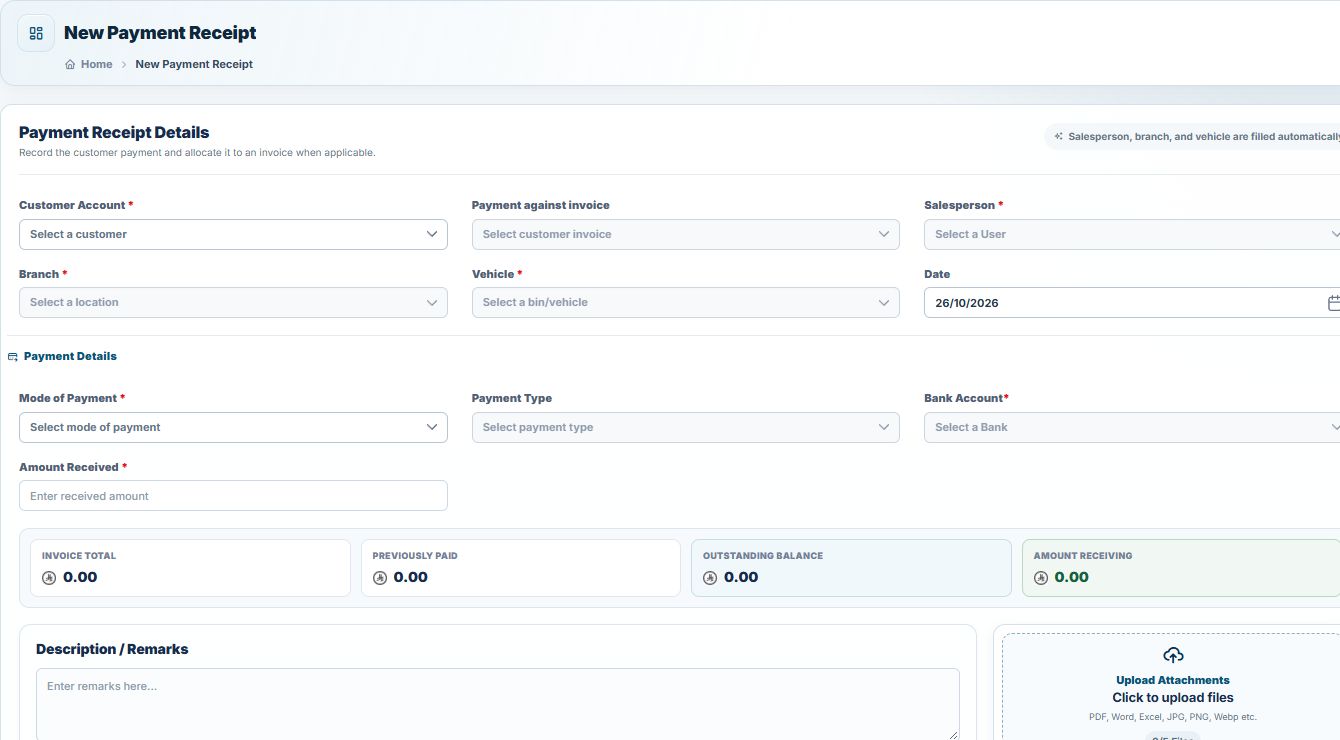
When collections run through an SFA app, each payment follows the same clean path.
No re-keying. No guessing which invoice was paid.
A payment that is not linked to an invoice creates work later. Someone has to call the rep, check the customer's statement and decide which invoices to close.
Good allocation in the app means:
It also means the system must handle edge cases gracefully: partial payments, overpayments, payments against invoices that have not synced yet, and unlinked advance payments. A collection app that crashes on an unusual case is worse than paper, because reps lose trust in it.
Collections and credit control are two sides of the same coin. An SFA app should enforce, before the sale:
When a rule blocks a sale, the rep should see why and have options: collect first, sell for cash, or request an approval from a manager.
Collections end with the handover. At the depot, the rep's app totals cash, cheques and transfers collected during the day, and the cashier confirms what was received. Any difference is visible immediately and tied to a person and a date, not discovered at month end.
Distributors that move collections into their SFA app typically see:
NobleSFA lets reps record cash, bank transfer and cheque payments during the visit, allocate them against open invoices, and print a numbered receipt on the spot. Credit limits, credit days and drop sizes are set per customer and enforced by the system. End-of-day reconciliation confirms every payment before the rep leaves the depot, and everything flows to NobleAccounts, NobleERP or your existing ERP.
Chasing receipts every morning? Talk to an expert about moving collections into the field.
Yes, with an offline-first app. The receipt is printed immediately and syncs to the back office when the connection returns.
Yes. The payment is allocated across multiple open invoices, and partial payments are supported.
A good app records them as unallocated payments on the customer's account, to be matched against future invoices.
The rep sends a request from the app and a manager approves or rejects it from the back office or their own phone.
Have a question about putting this into practice?
Talk to the TechQode team ↗KEEP EXPLORING
Most SFA projects fail on adoption, not technology. Use this 30-day rollout plan to move field reps from paper to a mobile sales app with less resistance.
Read the insightChoosing sales force automation software? Use these 12 questions on offline mode, ZATCA, ERP integration, invoice numbering, support and pricing to compare SFA vendors.
Read the insightA practical end-of-day checklist for van sales teams: reconcile van stock, cash, cheques, returns and invoices before the rep leaves the depot, and stop month-end surprises.
Read the insightBEFORE YOU GO
Tell us what is slowing your business down. In a focused 15-minute consultation, we’ll help you see the clearest way forward.